 Add text to get the translation that 22 AI models agree on


How to create a glossary for translation (with examples)
A glossary fails quietly. One product feature ends up with three different translated names across a help center, a pricing page, and a contract, and nobody notices until a customer asks which one is the real name. A glossary created before translation starts is the cheapest way to prevent that.
Learning how to create a glossary comes down to four decisions: which terms go in, how each one is defined, which translation is approved for each language, and who owns the list. Tomedes builds glossaries into the same workflow as translation memory and QA, because a glossary that sits in a spreadsheet nobody opens does not change what translators write.
The same steps work for a team of one or a team of fifty, and a first draft can come from a document you already have, using a free glossary generator.
Key takeaways
- A glossary is a list of terms with the meaning your organization uses, and a multilingual glossary adds the approved translation of each term for every target language.
- Digital.gov reports that a shared multilingual glossary reduces duplicate translation work and lowers costs.
- The National Center for State Courts puts the initial development of a legal glossary at $13,000 to $35,000.
- In Tomedes internal sampling of legal projects, 23% of initial translations needed minor legal corrections, and that rate fell to 6% after QA and glossary controls were added.
- A glossary only works when every term has a status, one named person approves changes, and the list is reviewed whenever a product version changes.
What is a glossary and what is it used for?
A glossary is a list of terms with their meanings, kept so everyone who writes or translates about a subject uses the same words the same way. It keeps documents consistent, explains jargon to new readers, and gives translators approved terms before they start.
A dictionary lists every meaning of a word. A glossary lists only the meaning your organization uses, plus the notes people need to apply it correctly. That narrow focus is why a glossary can settle a naming argument that a dictionary cannot.
Four jobs make a glossary worth the effort. It keeps terminology consistent across documents, explains jargon to new readers, saves translators and writers from researching the same term twice, and gives every language team the same starting point. For multilingual content the last job matters most, because a missing glossary is where one term turns into several translations.
How do you create a glossary?
Pick the terms that cause the most errors, define each one in plain language, add a context sentence, set the approved translation for each language, and review the list on a schedule. A tool can draft the first version from documents you already have.
1. Pick the terms that cause errors
Start with the terms that would do the most damage if they were translated inconsistently: product and feature names, interface labels, legal and regulatory terms, acronyms, and words with more than one meaning. Pull them from the documents translators will actually receive, such as product pages, contracts, support articles, and manuals. A short list that people use beats a long list that nobody opens.
2. Define each term in plain language
Write one short definition per term, in the sense your organization uses it. Mark any term that must stay in the source language, such as a brand or product name, so translators do not translate it. Note the synonyms and the variants that should never appear.
3. Add a context sentence
A term with several meanings needs an example sentence that shows the intended one. The word charge means a payment in a billing app and an electrical measurement in a hardware manual, and only the context sentence tells a translator which one applies. Add the part of speech when the same word can be a noun and a verb.
4. Set the approved translation for each language
Record one approved translation per term for each target language, and list the variants translators should avoid. Keep regional versions in separate columns when the markets differ, such as Spanish for Spain and Spanish for Mexico. A native-speaking linguist should confirm each entry before it is marked approved.
5. Organize the list so people can use it
One row per term keeps the list easy to sort, search, and import. These fields cover most translation projects.
| Field | What it holds | Why it matters |
|---|---|---|
| Term | The source word or phrase | Anchors the entry |
| Definition | One plain-language sentence | Prevents a wrong reading |
| Context sentence | An example of the term in use | Shows which meaning applies |
| Part of speech | Noun, verb, or adjective | Prevents form errors |
| Approved translation | One per target language | The decision translators follow |
| Avoid | Variants that must not be used | Stops old terms from returning |
| Status | Proposed, approved, or deprecated | Shows which entries are current |
| Owner | The person who approves changes | Keeps one decision-maker |
6. Load it where translators work
A glossary only changes translations when translators see it during the work. Import the list into the CAT tool as a termbase, so approved terms are flagged as a translator types and QA checks catch violations before delivery.
Send the glossary to your translation vendor with the source files and any earlier translations before the project starts, so the project manager can load it before the first segment is translated. Tomedes' guide to CAT tools explains how termbases and QA checks work in practice.
7. Name an owner and a review rule
Pick one person who approves new terms and settles disputes, and write down how changes reach translators. Set a review date, such as quarterly, and add a trigger for out-of-cycle reviews, such as a new product version or a rebrand.
What is a multilingual glossary, and how is it different?
A multilingual glossary is a shared list of terms with their approved translations in two or more languages. Digital.gov describes it as a tool for sharing common translations among subject matter experts, and reports that a shared glossary reduces duplicate translation work and lowers costs.
A bilingual glossary covers one language pair. A multilingual glossary covers several, which adds one approved-term column and one more review for every language added.
What does linguistic analysis add to a bilingual glossary?
Linguistic analysis checks each term for part of speech, word forms, and usage in context before the term is added. The glossary then records the exact form translators should use.
Languages with gender, case, or verb conjugations need this most. A Spanish adjective changes with the noun, a German noun changes with its role in the sentence, and an Arabic term can change with the word attached to it, so a glossary that records only the base form leaves translators guessing.
Frequency counts help decide what to include. A term that appears dozens of times in the source files earns an entry before a term that appears once. Tools can extract candidate terms and count them, and a linguist then confirms the form, the meaning, and the translation.
What are the best practices for bilingual glossaries?
Give each term one approved translation, record the variants to avoid, and keep a separate list of terms that must stay untranslated. Keep regional versions apart, version the file, and have a native-speaking linguist approve changes.
Keep one glossary per client and domain, because a legal term and a marketing term can need different translations for the same source word. Mixing domains in one list is the glossary version of a polluted translation memory.
In Tomedes internal sampling of legal projects, 23% of initial translations needed minor legal corrections. After QA and glossary controls were added, that rate fell to 6%. Tomedes applies the same controls in its legal translation services.
What is an example of a glossary?
A translation glossary entry pairs a source term with a definition, a context sentence, and the approved translation, plus a status. The example below shows four entries for a billing app translated into Spanish, including one product name that stays in English.
| Term | Definition | Context sentence | Approved Spanish | Avoid | Status |
|---|---|---|---|---|---|
| charge (noun) | An amount taken from a customer's payment method | A charge of $20 appears on your statement. | cargo | carga | Approved |
| workspace | A shared area where a team stores projects | Invite your team to the workspace. | espacio de trabajo | área de trabajo | Approved |
| Pro plan | The paid subscription tier (a product name) | Upgrade to the Pro plan. | Pro plan (do not translate) | Plan Profesional | Approved |
| dashboard | The main screen that shows account activity | Open the dashboard to see your usage. | panel de control | salpicadero (a car dashboard) | Proposed |
These rows are illustrative and do not come from a client glossary. Copy the column headers into Excel or Google Sheets to start your own.
Each row answers a question a translator would otherwise have to guess. Charge as a billing term is a different word from charge as a battery term, and the context sentence and the avoid column settle which one applies.
How do you generate a glossary from a document?
Upload the document to a term extraction tool, review the terms it finds, and set an approved translation for each one. Tomedes' Pre-Translation Toolkit extracts important terms from .docx, .txt, and .pdf files, and the Bilingual Glossary Generator compares a source text with its translation to build a bilingual list.
The Bilingual Glossary Generator accepts .docx, .txt, and .xliff files. It leaves proper names and street names unchanged and flags the terms that need consistent translation.
A generated glossary is a draft. A linguist still approves each term, because a tool can find a frequent phrase without knowing which translation a market prefers. Over 70% of Tomedes projects now start with AI pre-translation before human linguists refine them, and glossary drafting follows the same pattern: a tool proposes and a person decides.
Glossary development can be expensive at the high end. The National Center for State Courts' guidelines put the initial development of a legal glossary at $13,000 to $35,000, depending on factors such as available reference documents and the complexity of the glossary. That figure covers legal glossaries built for courts, and a product or campaign glossary is usually a smaller project.
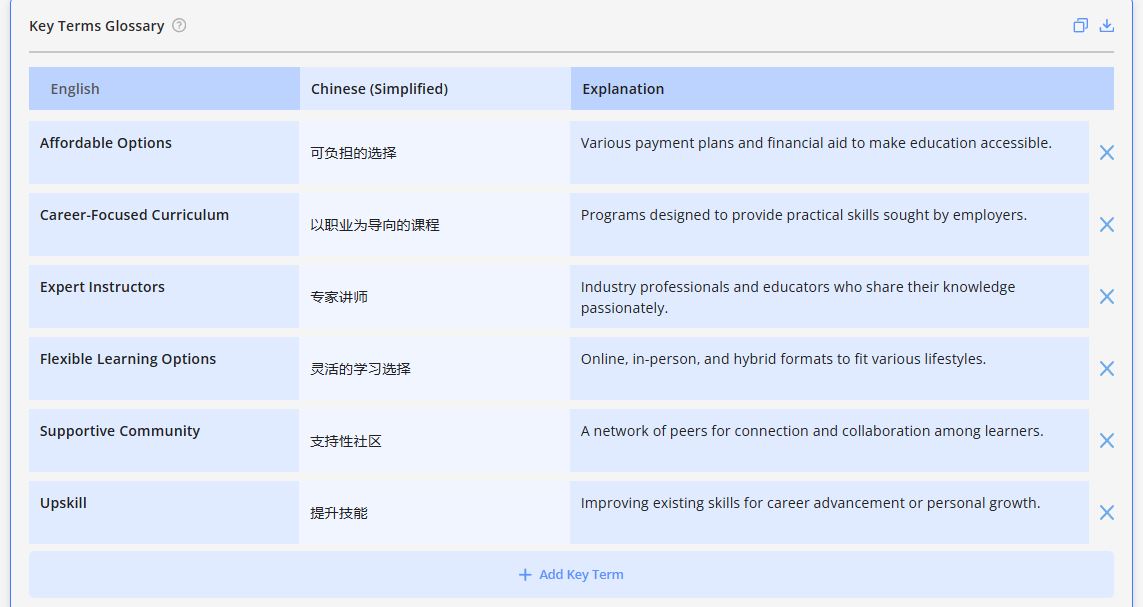
In a free sample run, the Pre-Translation Toolkit pulls terms from a document and proposes consistent translations. It standardizes terms such as "Flexible Learning Options" (灵活的学习选择) and "Career-Focused Curriculum" (以职业为导向的课程) for a Chinese translation.
A marketing agency standardizes campaign terms
A marketing agency needed consistent terminology across its international campaigns. It used the Pre-Translation Toolkit to detect frequently used terms, add or delete terms, spot inconsistencies, and build a unified glossary before translation began.
The tool output shows terms such as "Market Analysis" (تحليل السوق), "Search Engine Optimization (SEO)" (تحسين محركات البحث), and "Social Media Management" (إدارة منصات التواصل الاجتماعي) standardized in Arabic.
A healthcare organization checks a medical glossary
A healthcare organization needed to validate its medical glossary. It used the Bilingual Glossary Generator to compare translated terms with the original glossary, find incorrect translations, and check the terms against medical terminology standards.
The tool output shows Italian terms such as "Benessere Mentale" (Mental Well-being), "Protezione da Malattie Infettive" (Protection from Infectious Diseases), and "Controlli Medici Regolari" (Regular Check-ups) standardized.
What tools can create and manage a glossary?
A spreadsheet handles a basic glossary, and a CAT tool manages one as a termbase that flags approved terms while a translator works. Tomedes publishes free tools that draft a glossary from documents, and translation management platforms add shared access and approval workflows.
| Tool type | Best for | Limit |
|---|---|---|
| Spreadsheet (Excel or Google Sheets) | A first glossary and small teams | No term flagging inside the translation editor |
| Termbase in a CAT tool | Translators who need approved terms flagged as they type | Needs a CAT tool license and setup |
| Glossary generator (Tomedes Bilingual Glossary Generator and Pre-Translation Toolkit) | Drafting a glossary from existing files | The output is a draft that a linguist must review |
| Translation management platform | Teams that need shared access and approval workflows | More setup than a spreadsheet |
A termbase stores approved terms, and a translation memory stores approved sentences. Most teams start in a spreadsheet and move the approved list into a CAT tool once translation starts. Tomedes also publishes free AI tools that cover the drafting step, with no login required.
How do you keep a glossary current across product versions?
Give each term a status and a version note, assign one owner to approve changes, and review the glossary whenever a product version changes. Update the glossary first and the translation memory second, so old segments do not keep suggesting a retired term.
Three statuses cover most cases. Proposed means a term is waiting for review, approved means translators must use it, and deprecated means the term is retired and now sits in the avoid column.
When a product version changes a feature name, deprecate the old term and add the new one with a version note, so the history stays visible. Then update the translation memory, because old segments keep suggesting the retired term until they are corrected.
A 2025 Tomedes performance analysis found that clients who moved to agentic workflows saw a 40% reduction in terminology errors compared with standard single-pass translation. The lesson for a glossary owner is to check terminology more than once, with a tool first and a person second.
Set a review date, quarterly or annually, and gather feedback from translators and content creators, since they see term conflicts first. Name one glossary manager so every change is approved in one place.
To build a glossary into a translation project, contact Tomedes for a free consultation. Tomedes holds ISO 17100:2015, ISO 18587:2017, and ISO 9001:2015 certifications, works across 270+ languages, and puts a dedicated project manager and a 1-Year Quality Guarantee behind every project. Clients include Google, Microsoft, IKEA, and Amazon.
FAQs
Q: What is a multilingual glossary?
A: A multilingual glossary is a shared list of terms with their approved translations in two or more languages. According to Digital.gov, it lets teams reuse common translations, which reduces duplicate translation work and lowers costs. Each entry usually adds a definition, a context sentence, and a status.
Q: Is a glossary the same as a dictionary?
A: No, a glossary is not the same as a dictionary, because a dictionary lists every meaning of a word while a glossary lists only the meaning an organization uses, with notes on how to apply it. In translation, a glossary also records the approved term for each target language.
Q: What is the correct format for a glossary?
A: List terms alphabetically or by category, with one row per term. Each row holds the term, a plain-language definition, a context sentence, and a status. For translation, add the approved translation for each language, any variants to avoid, and a flag for terms that must stay untranslated, such as product names.
Q: How do I create a glossary in Word or Google Docs?
A: Insert a table with one row per term and columns for the term, definition, context sentence, and approved translation, then sort it alphabetically. Excel or Google Sheets is easier to sort and share. To skip the typing, upload a .docx or .txt file to the Bilingual Glossary Generator and review the terms it extracts.
Q: How do you maintain a glossary across multiple product versions?
A: Give every term a status and a version note, and name one owner to approve changes. Review the glossary whenever a product version, feature name, or campaign changes, and mark retired terms as deprecated and keep them in the file. Then update the translation memory so old segments stop suggesting the retired term.

Written by Clarriza Heruela
Clarriza Mae Heruela graduated from the University of the Philippines Mindanao with a Bachelor of Arts degree in English, majoring in Creative Writing. Her experience from growing up in a multilingually diverse household has influenced her career and writing style. She is still exploring her writing path and is always on the lookout for interesting topics that pique her interest.
Share:

Post your Comment